# Unit GLASS library
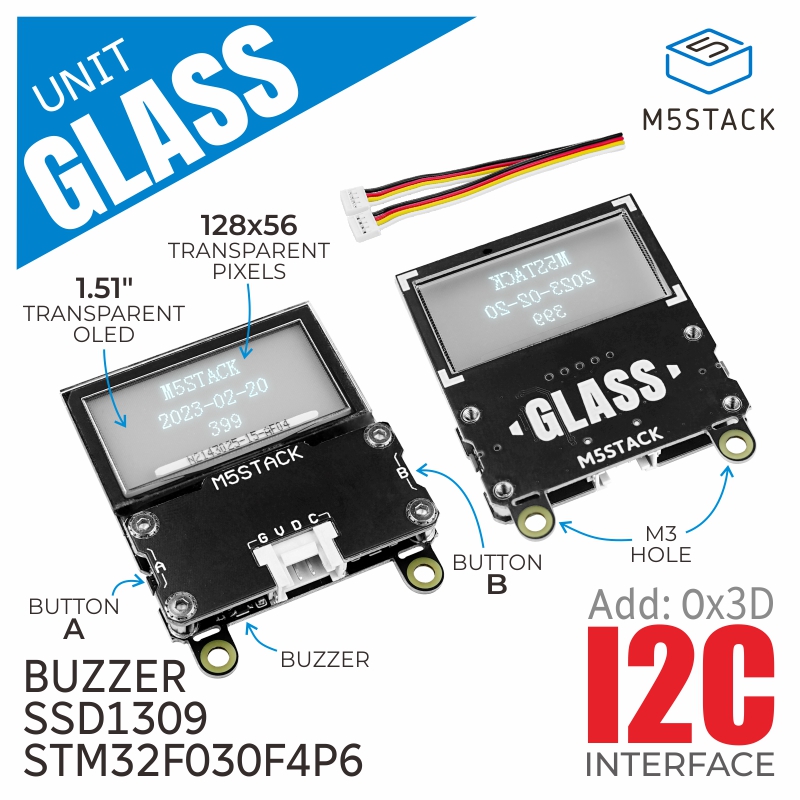 Sample Code:
```
#include
M5UnitGLASS display;
void setup(void)
{
// initialize
// 初期化
// SDA, SCL, Freq, I2C PortNumber
display.init(GPIO_NUM_21, GPIO_NUM_22, 400000u);
// Set the display orientation
// ディスプレイの向きを設定
// 0 = 270 deg / 1 = normal / 2 = 90 deg / 3 = 180 deg / 4~7 = upside down
display.setRotation(1);
display.startWrite();
for (int y = 0; y < display.height(); ++y)
{
for (int x = 0; x < display.width(); ++x)
{
display.drawPixel(x, y, display.color888(x*2, x*2+y*2, y*2));
}
}
display.endWrite();
for (int i = 0; i < 16; ++i)
{
int x = rand() % display.width();
int y = rand() % display.height();
display.drawCircle(x, y, 16, rand());
}
}
bool buz_en = false;
void loop(void)
{
static constexpr const char hello_str[] = "Hello Unit GLASS !";
int i_end = -display.textWidth(hello_str);
for (int i = display.width(); i > i_end; --i)
{
// get key A status : 0==pressed / 0!=released
if (display.getKey(0) == 0) {
buz_en = !buz_en;
display.setBuzzerEnable(buz_en);
}
// get key B status : 0==pressed / 0!=released
if (display.getKey(1) == 0) {
display.setBuzzer((i - i_end) << 4, 128);
}
display.drawString(hello_str, i, (display.height() - display.fontHeight()) >> 1);
}
delay(5);
}
```
Sample Code:
```
#include
M5UnitGLASS display;
void setup(void)
{
// initialize
// 初期化
// SDA, SCL, Freq, I2C PortNumber
display.init(GPIO_NUM_21, GPIO_NUM_22, 400000u);
// Set the display orientation
// ディスプレイの向きを設定
// 0 = 270 deg / 1 = normal / 2 = 90 deg / 3 = 180 deg / 4~7 = upside down
display.setRotation(1);
display.startWrite();
for (int y = 0; y < display.height(); ++y)
{
for (int x = 0; x < display.width(); ++x)
{
display.drawPixel(x, y, display.color888(x*2, x*2+y*2, y*2));
}
}
display.endWrite();
for (int i = 0; i < 16; ++i)
{
int x = rand() % display.width();
int y = rand() % display.height();
display.drawCircle(x, y, 16, rand());
}
}
bool buz_en = false;
void loop(void)
{
static constexpr const char hello_str[] = "Hello Unit GLASS !";
int i_end = -display.textWidth(hello_str);
for (int i = display.width(); i > i_end; --i)
{
// get key A status : 0==pressed / 0!=released
if (display.getKey(0) == 0) {
buz_en = !buz_en;
display.setBuzzerEnable(buz_en);
}
// get key B status : 0==pressed / 0!=released
if (display.getKey(1) == 0) {
display.setBuzzer((i - i_end) << 4, 128);
}
display.drawString(hello_str, i, (display.height() - display.fontHeight()) >> 1);
}
delay(5);
}
```