| .. | ||
| src | ||
| img_00.png | ||
| img_01.png | ||
| img_02.png | ||
| img_03.png | ||
| img_pio.png | ||
| platformio.ini | ||
| README.md | ||


Steps to run M5GFX on a PC. ( VisualStudioCode + PlatformIO + SDL2 environment. )
Step 1. install Visual Studio Code and make PlatformIO ready for use.
https://docs.m5stack.com/ja/quick_start/m5unified/intro_vscode
Step 2. PlatformIO to allow platform = native to be built.
https://docs.platformio.org/en/latest/platforms/native.html#installation
for Windows
follow the MSYS2 installation guide . Run the following command on msys2 to install gcc and gdb .
pacman -S mingw-w64-ucrt-x86_64-gcc mingw-w64-ucrt-x86_64-gdb
Add the following paths to the PATH system environment variable:
C:\msys64\mingw64\bin
C:\msys64\ucrt64\bin
C:\msys64\usr\bin
for Linux
open the system terminal and run the following commands:
sudo apt update
sudo apt install build-essential
for macOS
open the system terminal and install Xcode Command Line Tools
xcode-select --install
Step 3. Enable SDL2 on PlatformIO.
for Windows
Go to the SDL repository on github and obtain the release package (SDL2-devel-x.x.x-mingw.zip).
Unzip the zip file and copy the following four files to C:\msys64\ucrt64
- share
- bin
- include
- lib
for Linux
open the system terminal and run the following commands:
sudo apt-get install libsdl2 libsdl2-dev
for macOS
Install sdl2 using Homebrew.
brew install sdl2
Step 4. Execute !
Open the PlatformIO_SDL folder containing this document in PlatformIO.
Click on the  icon on the left side of the screen.
Click PROJECT TASKS -> native -> General -> Upload
※ If you are using arm processor, use native_arm instead of native (e.g. M1mac)
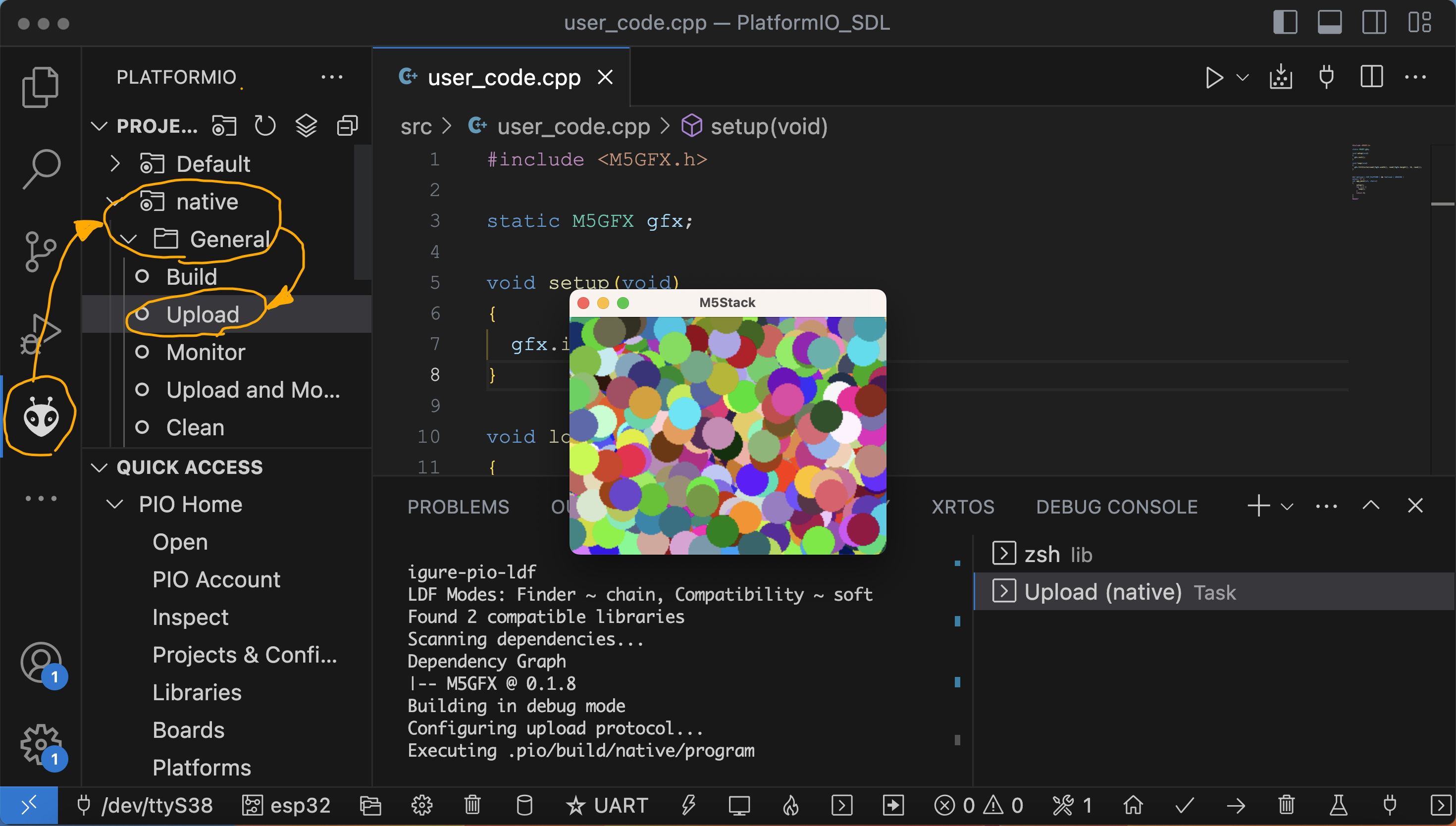
※ The window may start up with the window hidden behind. Check the task tray.
Step 5. Use debugger.
for macOS
If you want to use the debugger on a mac, lldb is available.

EXPLORER -> .vscode -> launch.json -> Add Configuration... -> C/C++: (lldb) Launch

Rewrite the "program" : "${workspaceRoot}/.pio/build/native/program"
(The native part should match the environment name in PlatformIO)

Pressing the F5 key allows debugging execution.